A woman once brought in a photograph that had survived a house fire. The edges were brittle. The center looked gray and cloudy. Faces were hard to make out, and parts of the paper had curled inward from heat.
She assumed the image was gone for good. She kept it anyway because it was the only picture of her grandparents together.
Stories like this are common. People often hold onto damaged photos long after they stop believing those images can be saved. The surprise comes later, when restoration reveals details that felt lost.
So the real question is not whether extremely damaged photos look impossible. The question is what still exists beneath the damage.
What does “extremely damaged” mean?
Severe photo damage rarely shows up in just one form. Most images that reach this stage carry several problems layered together.
A photo may have tears across faces, fading from sunlight, stains from water, and surface cracks caused by age. Each issue adds noise and hides detail, which makes the image feel unreadable at first glance.
Time plays a quiet role here. Older photos were printed using chemical processes that react to light, air, and humidity.
As those reactions continue over decades, contrast weakens, and colors drift. Skin tones flatten. Shadows disappear. None of that means the image data is gone. It means the data is buried.
Why do damaged photos look worse than they are?
Human vision is quick to judge damage. We see blank patches and assume nothing remains underneath. Restoration experts approach the image differently. They look for patterns, edges, and tonal transitions that still exist at a microscopic level. High-resolution scans reveal information that the naked eye misses.
A crease across a face does not erase the face. It interrupts it. Water stains do not always destroy ink. They often push pigment outward, leaving faint outlines behind. Smoke damage clouds surfaces, yet original detail often survives under that haze.
Once these hidden traces are identified, careful digital work begins to rebuild what time disrupted.
What modern restoration can realistically repair?
Digital restoration focuses on reconstruction, not replacement. The goal stays grounded in what the photo already contains. When a tear cuts through clothing or background areas, surrounding texture guides the repair.
Cracks across skin can be smoothed while keeping natural contours intact. Faded areas regain depth by balancing the light and shadow that still exist in the scan.
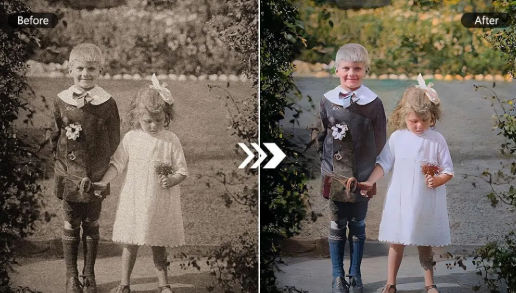
Color restoration works the same way. Many old photos retain color data that only needs correction and balance.
Black and white images can also be colorized when enough reference information is available. This process relies on historical accuracy and facial cues rather than guesswork.
These techniques form the backbone of professional old photo restoration, where patience matters more than speed and subtlety matters more than dramatic change.
Where restoration reaches its limits?
Some boundaries remain firm. When a section of a photo is completely missing, and no surrounding reference exists, accurate reconstruction becomes difficult. Large missing facial features fall into this category.
Heavy blur from the original camera exposure also limits results, since blur removes structure before damage ever occurs.
Scan quality plays a role as well. Low-resolution scans restrict how much detail can be recovered. That is why professional restoration starts with high-resolution digitization. More data creates more room for repair.
Clear communication helps here. Skilled restorers explain what can be improved and what will stay imperfect. Trust grows when expectations match reality.
How do experts decide what is possible?
Restoration begins with assessment. The image is examined layer by layer, looking at contrast, texture, and damage patterns. Restorers ask where the eye naturally travels and which areas matter most emotionally. A background flaw matters less than a missing expression.
Reference images help guide the process. Family photos taken around the same time provide clues about facial features, hairstyles, and clothing. Even written descriptions from relatives can help fill small gaps.
Each photo follows its own path. No preset workflow exists because no two damaged images fail in the same way.
See also: Fashion Product Developer and Tech Designers
Why does digital restoration protect original photos?
Physical repair places old paper under stress. Heat, moisture, and pressure increase risk during manual handling. Digital restoration avoids those hazards. The original photo stays untouched after scanning, stored safely, while all work happens on a digital copy.
This approach also allows revisions without risk. Changes can be refined gradually until the result feels right. The original remains exactly as it arrived, only safer.
When restoration makes sense?
Restoration carries the most value when a photo cannot be replaced. Family portraits, milestone moments, and images tied to identity often fall into this category. Many people restore photos so they can share copies with relatives without risking the original again.
Others restore images to preserve family records for future generations. Digital files make that possible without further wear.
A final reflection
That fire-damaged photograph of the grandparents was restored enough for faces to reappear. The paper still showed its age. The damage did not vanish. What returned was a connection. The couple could be seen together again, smiling faintly, exactly as they were remembered.
Extreme damage rarely means the end of a photograph. More often, it marks the point where careful restoration becomes meaningful.